Apple MacBook Pro 17(820-2849 A) Schematic
%20Schematic.jpg "Apple MacBook Pro 17(820-2849 A) Schematic")
Apple MacBook Pro 17(820-2849 A) Schematic
In the ever-changing technological scene, Apple's MacBook Pro line stands out as a symbol of innovation and performance. The Apple MacBook Pro 17 (820-2849 A) Schematic is a critical component that ensures the device's operation. In this post, we'll go inside the MacBook Pro schematic, examining its relevance, components, and how it contributes to the laptop's overall operation.
Understanding Schematics: A Brief Overview
What is a Schematic?
Schematics are visual representations of electronic circuits, commonly known as circuit diagrams. Engineers and technicians may use these diagrams to design, repair, and comprehend electrical devices by using symbols to represent various components and connections inside a circuit.
The Role of Schematics in MacBook Pro 17
The MacBook Pro 17 (820-2849 A) schematic is a thorough guide for understanding the laptop's sophisticated electrical architecture. The schematic provides a visual roadmap that assists in identifying and correcting technical faults, from the power supply to the CPU and every component in between.
Key Components and Sections
Power Delivery and Regulation
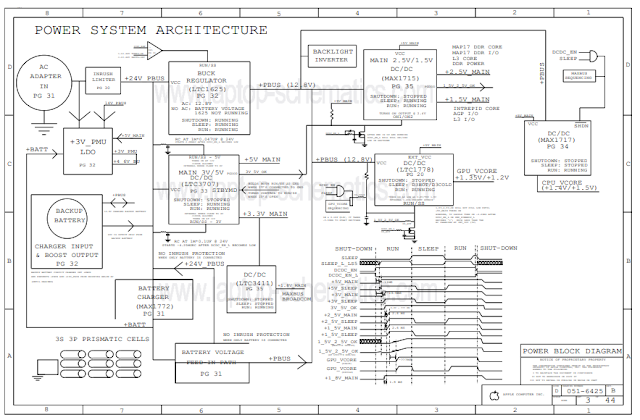
The schematic's power delivery section describes how the laptop receives and distributes electricity from the battery and other sources. It includes voltage regulators, capacitors, and connections to ensure that power flows smoothly throughout the device.
Central Processing Unit (CPU) Circuit
At the heart of the MacBook Pro 17 lies the CPU circuitry. The schematic details the connections, clock signals, and support components that enable the CPU to process instructions and perform computations at lightning speed.
Memory and Storage Configuration
The memory and storage settings section shows how data is stored and retrieved within the laptop, from RAM modules to solid-state drives. Engineers can use the schematic to optimize data transmission rates and provide flawless multitasking capabilities.
Display and Graphics
The display and graphics area are responsible for the MacBook Pro 17's visual brilliance. Experts can grasp the connections between the graphics card, display panel, and other display-related components by decoding the schematic.
I/O Ports and Connectivity
The USB ports, Thunderbolt connections, audio jacks, and networking components are highlighted in the I/O ports and connectivity section. This section of the schematic explains how the laptop communicates with external devices and networks.
The Importance of Schematics in Repairs
When a technical problem arises, Apple technicians and repair professionals consult the MacBook Pro 17 schematic for assistance. The thorough representation of circuits in the schematic assists in the diagnosis of hardware faults and promotes quick repairs. This inventiveness guarantees that users receive a dependable and high-performance equipment.
Unlocking Innovation: How Schematics Drive Advancements
Research and Development
Schematics are invaluable during the research and development phase of new MacBook Pro models. Engineers refer to existing schematics to build upon proven designs and integrate new features seamlessly.
Customization and Modifications
Schematics enable customization and modification for tech enthusiasts and hackers. Individuals who understand the subtleties of the schematic may modify components, experiment with upgrades, and build unique MacBook Pro combinations.
Conclusion
Finally, the Apple MacBook Pro 17 (820-2849 A) schematic is an unsung hero that helps engineers, technicians, and enthusiasts. It reveals the intricate labyrinth of connections and components that make the MacBook Pro 17 such an amazing piece of technology. Schematics are essential for repairs, advancements, and understanding the device's design.